TradingView Black Friday 2026: What Is on Offer and Which Plan to Pick
TradingView has a Black Friday sale page up, but it does not state a discount yet. As of 19 November 2026 the page shows only a countdown that ends on Monday 23 November. Choose a plan by its limits first, so the sale changes the cost and not the choice.
We earn a commission if you sign up through links on this page.
Covered on this page: TradingView.
TradingView’s Black Friday 2026 sale is announced as a page with a countdown, and nothing more yet. This page is a dated record of what TradingView’s own site says, plus the part that does not depend on the sale: which plan to pick. It prints no prices and no discount figures for 2026, because TradingView has not stated any. Last checked: 19 November 2026. Next check: 23 November 2026.
TradingView Black Friday 2026 at a glance
| Question | What TradingView’s own pages showed, as of 19 November 2026 |
|---|---|
| Is a 2026 sale announced? | Yes, as a page titled “TradingView Black Friday Sale” with the word “Launches in” and a countdown |
| When does it start? | The countdown, read at 5:03 p.m. Pacific on 19 November, had 3 days and 6 hours and 57 minutes left. That ends at about midnight Pacific as Monday 23 November begins |
| What is the discount? | Not stated |
| Which plans are in it? | Not stated |
| When does it end? | Not stated |
| Any terms, such as new subscribers only? | Not stated |
| Is there a blog post about it? | No. None of the 20 newest posts on TradingView’s English blog was about a sale |
| Does the pricing page mention it? | No. The pricing page carried no Black Friday notice. Its paid plan cards showed a “Special price” label with no sale named |
| When is Black Friday? | Friday 27 November 2026 |
The only button on the sale page was “Stay notified”. The full page is at tradingview.com/black-friday.
What is on offer for TradingView Black Friday 2026?
As of 19 November 2026, nothing with a number on it. The sale page names no plan, no discount and no end date. Any figure seen elsewhere before TradingView posts it is a guess or a copy of an older year, and this page repeats none, for this year or for past ones.
What will be filled in here once TradingView publishes it:
| Detail | Status on 19 Nov 2026 | Where it will be read |
|---|---|---|
| Plans included | not published | Sale page and pricing page |
| Monthly, yearly or both | not published | Order page |
| What the plan renews at after the first term | not published | Order page |
| Who qualifies | not published | Sale page terms |
| Start and end dates | countdown only | Sale page |
How do you choose a TradingView plan before the sale?
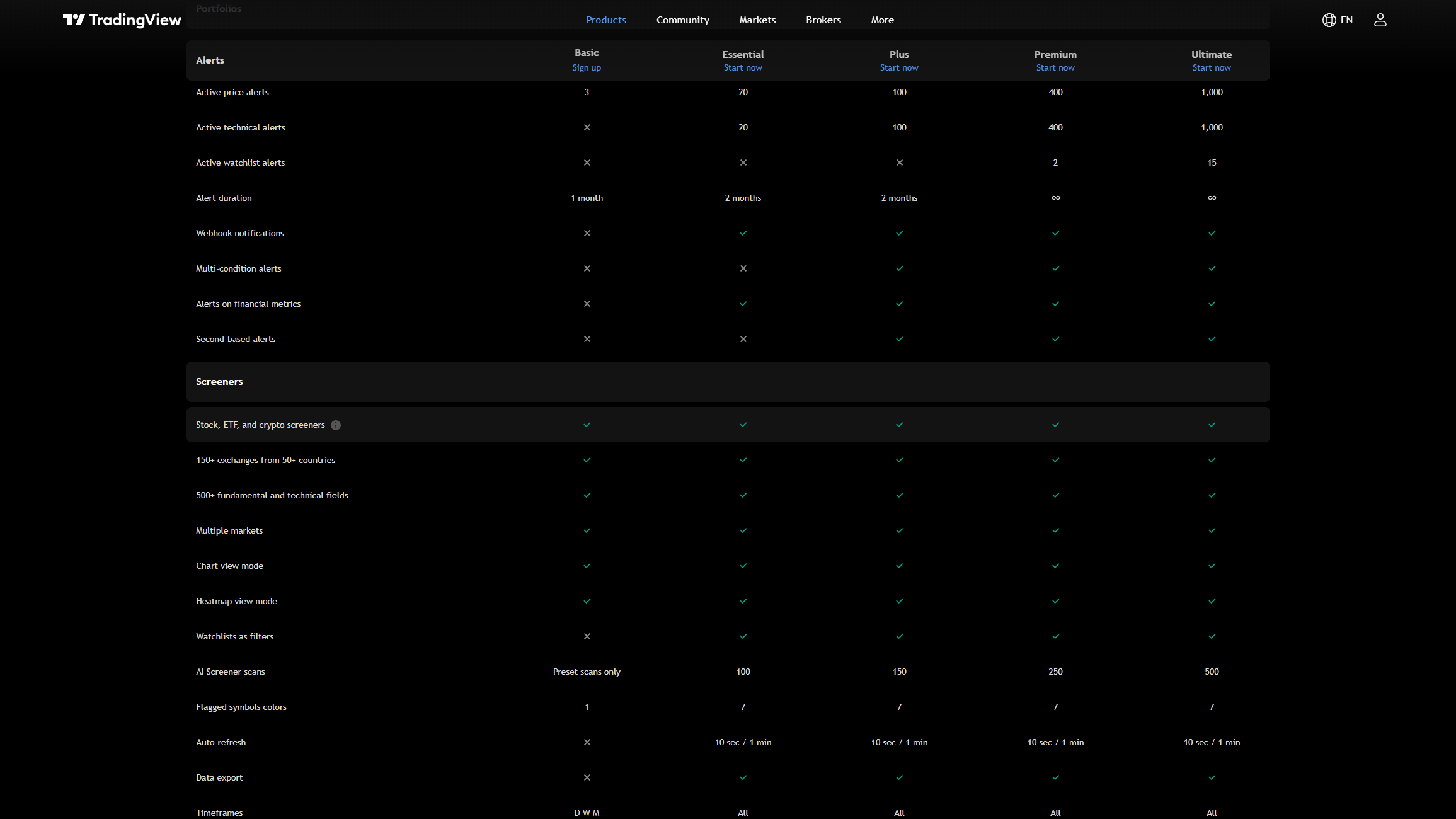
Choose from the limits, then let the sale set the bill. The plan a trader needs is the same on 22 November as on 23 November. These are the limits most choices turn on, read from TradingView’s plan table.
| Limit (as of 19 Nov 2026) | Basic (free) | Essential | Plus | Premium | Ultimate |
|---|---|---|---|---|---|
| Charts per tab | 1 | 2 | 4 | 8 | 16 |
| Indicators per chart | 2 | 5 | 10 | 25 | 50 |
| Price alerts | 3 | 20 | 100 | 400 | 1,000 |
| Alerts on indicators | none | 20 | 100 | 400 | 1,000 |
| Alerts with several conditions | no | no | yes | yes | yes |
| Intraday bars of history | 5K | 10K | 10K | 20K | 40K |
| Bar Replay on minute data | none | 180 days | 365 days | all | all |
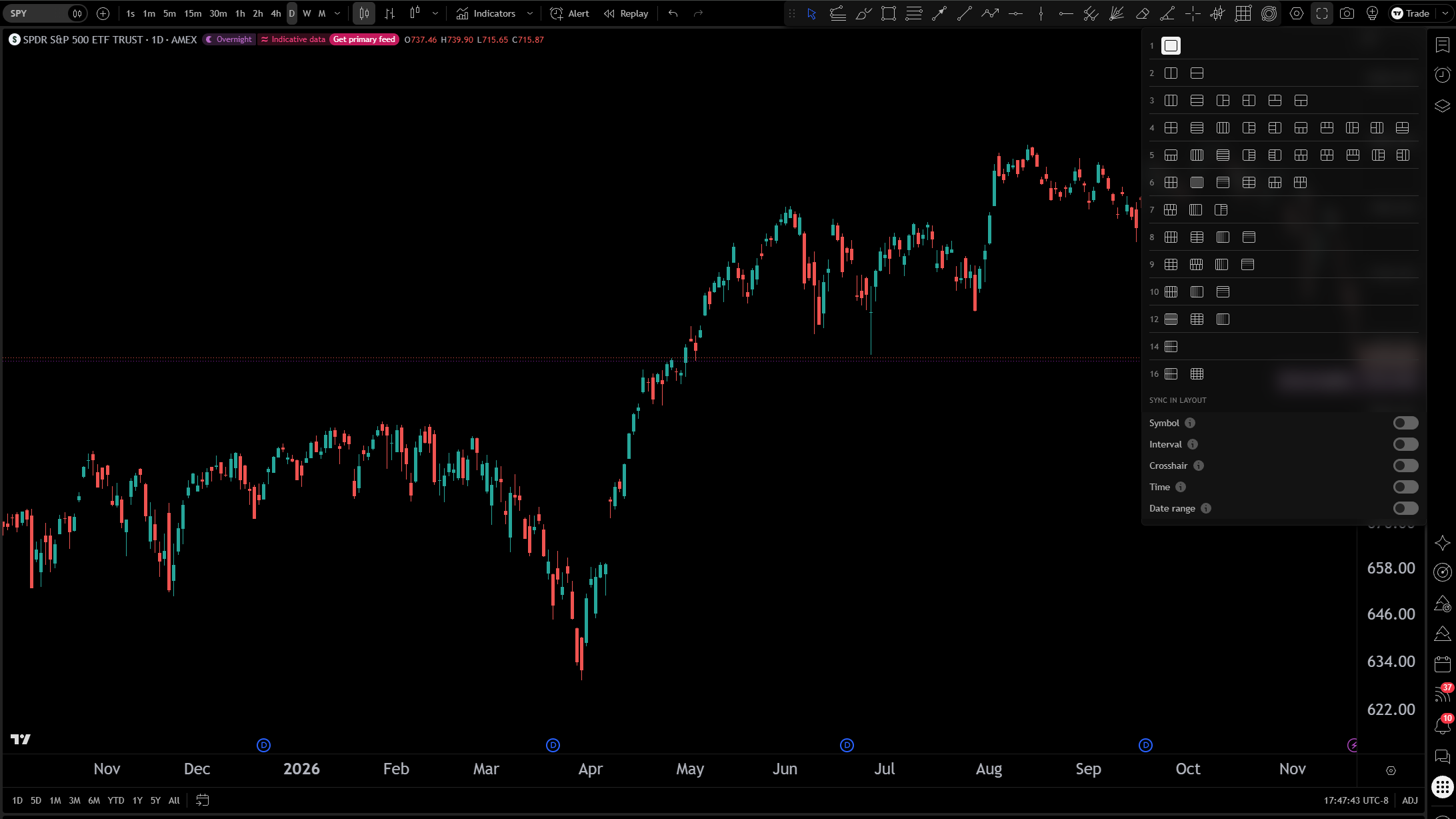
The free plan first. A routine of one chart, two indicators and up to three price alerts fits Basic, and Basic is not part of any sale because it costs nothing. Daily charts show their full history on it.
Then the lowest paid plan that passes every line. Two charts side by side or one alert on an indicator points to Essential. Alerts with several conditions or four charts point to Plus. Deep backtesting or alerts that never expire point to Premium. The longer version, with a worked routine, is on the TradingView free vs paid page.
Who should not buy during the sale: anyone whose routine fits Basic, anyone who cannot yet name the limit they keep hitting, and anyone moving up a plan only because the gap looks small that week. A higher plan that goes unused is not a saving.
What should you check at checkout?
| Check | What TradingView’s pages say (read 19 Nov 2026) | Why it matters in a sale |
|---|---|---|
| Billing cycle | “The service is billed in advance monthly or annually.” | A sale price may apply to one cycle only; confirm which one is selected |
| Renewal | “All billing is recurring, which means you will continue to get billed until you cancel your subscription.” | The Terms do not say what a discounted plan renews at. Read the renewal line on the order page |
| Refund, pricing page | “Refunds are available for annual plans only and must be requested within 14 calendar days of payment.” | Fourteen days is the window to decide |
| Refund, Terms of Use | Annual and monthly subscriptions, within 14 calendar days of the payment, once per account | The two pages differ; treat the stricter one as the rule |
| Upgrades | The pricing page says there are no refunds for “upgrades to a more expensive plan, monthly plans or market data” | An upgrade made during the sale cannot be undone for money |
| Canceling | “You can cancel your subscription anytime and it will not auto-renew after the current paid term.” | Canceling stops the next bill, not the current term |
| Failed yearly renewal | “If auto-renewal fails for an annual plan, you will automatically be switched to a monthly plan.” | A lapsed card can move a yearly plan to monthly billing |
| Phone apps | “Rates offered in mobile stores and on the web-based platform might differ.” | App-store purchases follow the store’s own refund rules |
| Sales tax | “depending on your location, a sales tax could be added to your final bill” | The total can be higher than the headline number |
Already on a paid plan? The sale page did not say whether current subscribers qualify. What the pricing page does say is that a yearly plan can be upgraded at any time, with the unused days converted to their value on the new plan, and that a downgrade starts when the current term ends.
Trials. The Terms say a free trial’s length “may vary depending on the plan, region, and platform” and that it converts to the paid plan unless canceled first. Whether a trial can be combined with a sale price is not stated anywhere we could read.
When this TradingView Black Friday page gets updated
| Date | What happens to this page |
|---|---|
| 19 November 2026 | First version. TradingView’s pages read; no discount stated |
| 23 November 2026 | Sale page, pricing page and blog read again after the countdown ends. Plans, cycle, renewal line, terms and end date added from TradingView’s own pages |
| After the sale closes | The page stays, marked as a record of the 2026 sale |
If the sale page changes before the next check, the sale page is right and this page is behind. How the platform itself works is on the TradingView page, and how to set up TradingView shows a layout that fits inside any plan.
Questions people ask
Does TradingView have a Black Friday sale in 2026?
TradingView has a Black Friday page for it with a countdown. As of 19 November 2026 the page gave no discount, plan list, end date or terms.
When does the TradingView Black Friday sale start?
The countdown on TradingView’s page, read on 19 November 2026, ends as Monday 23 November begins in the Pacific time zone. TradingView had not posted a start date in words.
Is the TradingView Black Friday deal only for yearly plans?
Not stated. As of 19 November 2026 the sale page named no billing cycle. Check which cycle is selected on the order page.
Should you wait for Black Friday to upgrade TradingView?
If a routine already fails on the free plan and the sale is days away, waiting costs little. If the routine fits Basic, there is nothing to buy at any price.
Can you get a refund on a TradingView Black Friday purchase?
TradingView’s pricing page allows refunds on annual plans asked for within 14 calendar days of payment. Its Terms of Use word the rule differently, so read both before paying.
Related
TradingView free vs paid sets every plan’s limits side by side. TradingView explains the platform, and how to set TradingView alerts covers the feature that decides most upgrades.
Before the sale opens, write down the plan a normal session needs and the reason in one line, such as two charts side by side or one alert on the RSI. On the order page, check three things: the billing cycle, what the plan renews at, and the refund window. If the reason line is empty, stay on the free plan.
This page is educational, not financial advice. Test every idea on your own charts before risking money. We earn a commission if you sign up through links on this page. It costs you nothing and it does not decide what appears here or in what order — how these pages are made is set out in our methodology.